Install Travel Demo
Deploy the Travel Demo
This demo application deploys several services grouped into three namespaces:
- travel-control — business dashboard to configure traffic and view statistics
- travel-portal — shop simulators that generate traffic
- travel-agency — quote and pricing services
At this step, deploy the application without joining it to the service mesh. Sidecar injection is added in Join the Mesh.
Do not label the namespaces with istio-injection=enabled yet.
Kind
From the Kiali source repository, the Travel Demo install script creates the namespaces and deploys the manifests without enabling auto-injection:
./hack/istio/install-travel-agency-demo.sh -c kubectl -ai false
Alternatively, run the commands manually:
kubectl create namespace travel-agency
kubectl create namespace travel-portal
kubectl create namespace travel-control

kubectl apply -f <(curl -L https://raw.githubusercontent.com/kiali/demos/master/travels/travel_agency.yaml) -n travel-agency
kubectl apply -f <(curl -L https://raw.githubusercontent.com/kiali/demos/master/travels/travel_portal.yaml) -n travel-portal
kubectl apply -f <(curl -L https://raw.githubusercontent.com/kiali/demos/master/travels/travel_control.yaml) -n travel-control
travels/ instead of downloading them.
OpenShift
The install script also handles OpenShift-specific setup (NetworkAttachmentDefinitions and SecurityContextConstraints):
./hack/istio/install-travel-agency-demo.sh -c oc -ai false
Alternatively, substitute oc for kubectl in the manual commands above and add the necessary NetworkAttachmentDefinition to each namespace, along with SecurityContextConstraints for the service accounts in those namespaces (minimally, default).
Verify the deployment
Confirm workloads are running
Check that all deployments rolled out. Pods should show 1/1 ready — there are no sidecars yet:
kubectl get deployments -n travel-control
NAME      READY   UP-TO-DATE   AVAILABLE   AGE
control   1/1     1            1           85s

kubectl get deployments -n travel-portal
NAME      READY   UP-TO-DATE   AVAILABLE   AGE
travels   1/1     1            1           91s
viaggi    1/1     1            1           91s
voyages   1/1     1            1           91s

kubectl get deployments -n travel-agency
NAME            READY   UP-TO-DATE   AVAILABLE   AGE
cars-v1         1/1     1            1           96s
discounts-v1    1/1     1            1           96s
flights-v1      1/1     1            1           96s
hotels-v1       1/1     1            1           96s
insurances-v1   1/1     1            1           96s
mysqldb-v1      1/1     1            1           96s
travels-v1      1/1     1            1           96s
The portal workloads generate traffic to the travel agency services automatically.
Confirm in Kiali
Open Kiali and select Overview. This page summarizes what is in the service mesh — control planes, data planes, applications, and services that participate in the mesh.
Because the Travel Demo was deployed without sidecars, it is not part of the mesh yet. The Overview page should look much the same as before the demo was installed. You should still see the Istio control plane, and mesh counts such as data plane namespaces should remain at 0.
To see the demo namespaces, open the Namespaces page. The three Travel Demo namespaces should be listed:
travel-controltravel-portaltravel-agency
In the Type column, each namespace shows a - badge. Hover over the badge to see the tooltip Not part of the mesh:
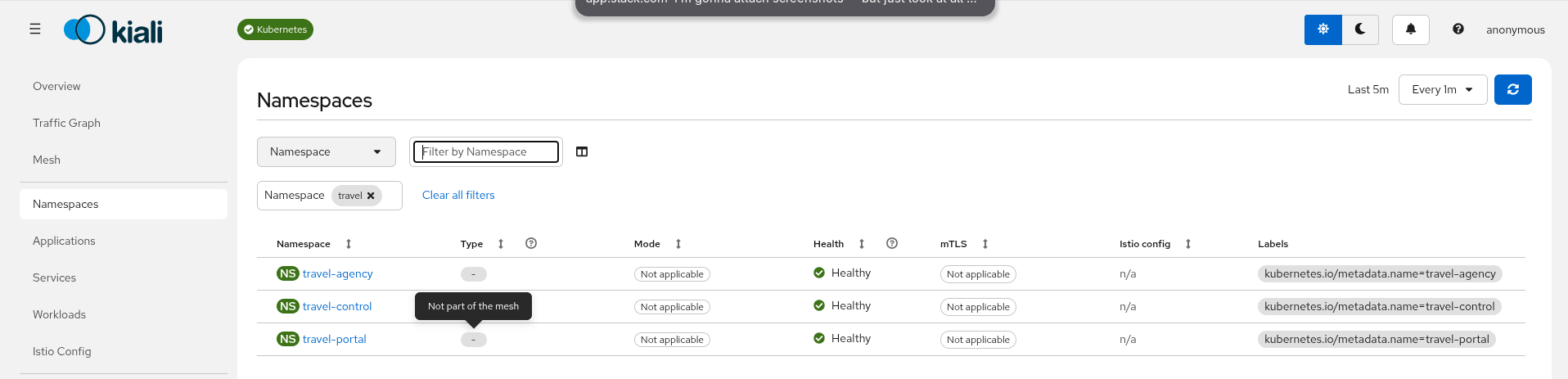
Sidecar injection is covered in Join the Mesh, when these namespaces begin to appear as part of the mesh.
Understanding the demo application
The Travel Demo simulates a travel booking scenario across three namespaces. Traffic flows in one direction:
travel-control → travel-portal → travel-agency
The control dashboard configures how each portal shop behaves. The portal shops generate requests. The agency services respond with travel quotes.
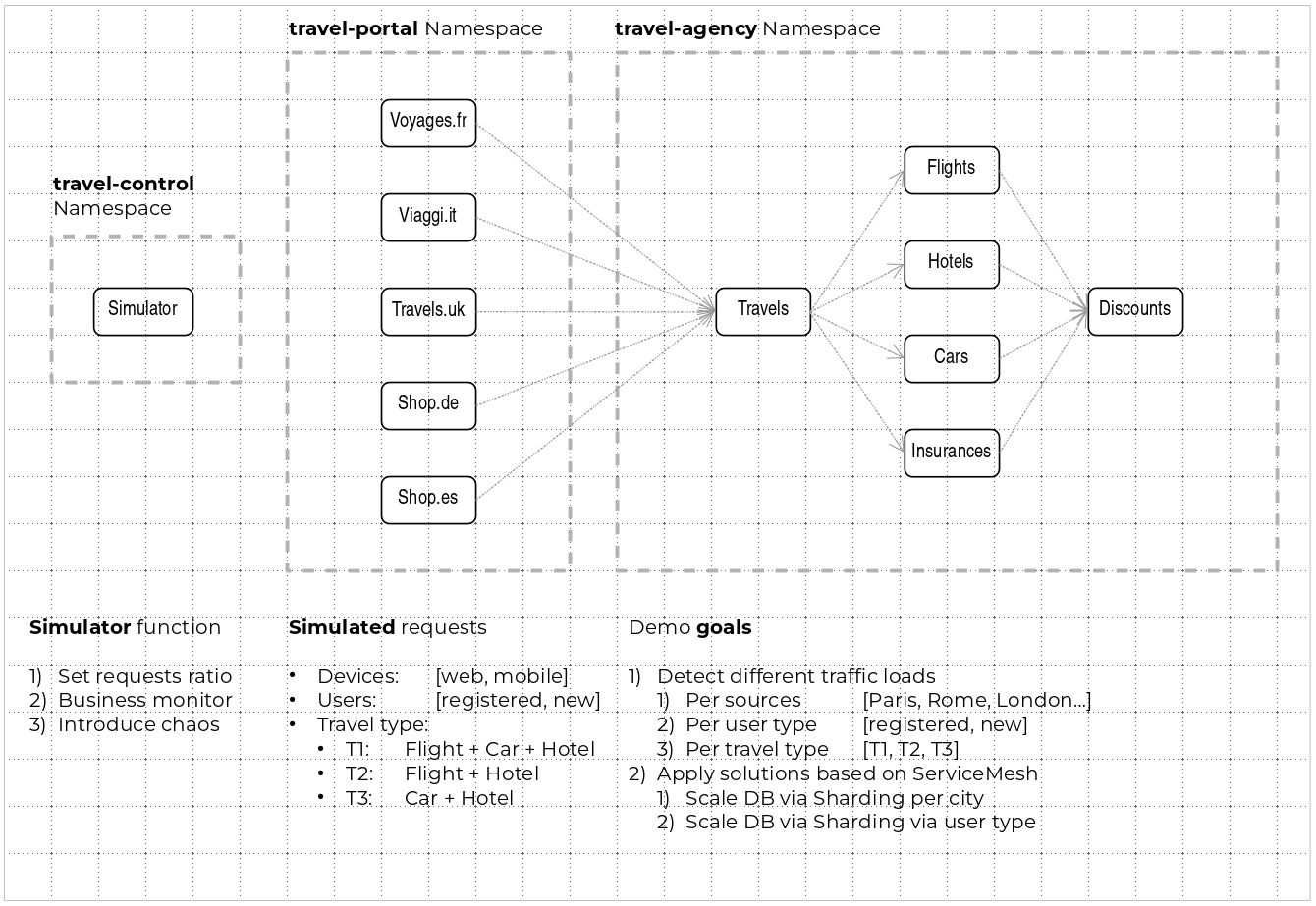
How traffic flows
A typical request path looks like this:
- Settings on the control dashboard determine how each portal shop sends traffic (device, user type, travel type, and volume).
- A portal shop in travel-portal queries the travels service in travel-agency for available destinations.
- The travels service queries hotels and returns destination options to the portal.
- When a destination and travel type are selected, travels aggregates quotes from flights, cars, hotels, insurances, and discounts.
- Cars, hotels, and flights may apply discounts depending on user type.
Travel Control namespace
The travel-control namespace hosts a business dashboard with two roles:
- Configure every travel shop simulator — traffic ratio, device, user, and type of travel.
- View a business summary of requests from travel-portal to travel-agency, grouped by shop, traffic type, and city.
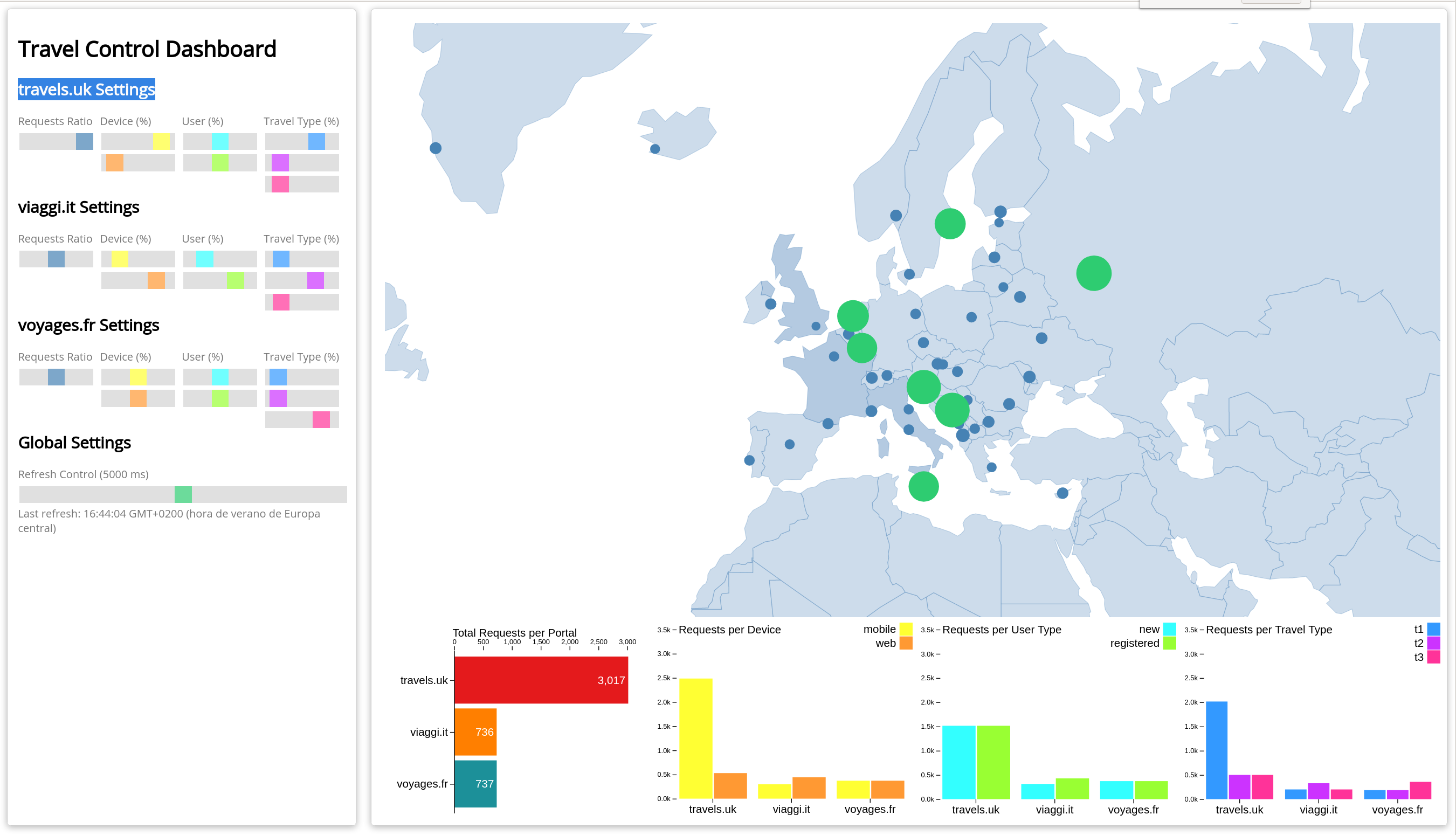
Preview the Travel Dashboard (optional)
The control service is not exposed outside the cluster yet — that happens in Join the Mesh. To preview the dashboard now:
kubectl port-forward svc/control 8080:8080 -n travel-control
Open http://localhost:8080/ in your browser.
Travel Portal namespace
The travel-portal namespace runs several travel shop simulators (for example travels, viaggi, and voyages). Each shop represents a different portal with its own traffic characteristics.
Shops differ by channel (web or mobile), user type (new or registered), and travel type. Together they produce varied traffic patterns so you can explore realistic mesh scenarios in Kiali.
All portal shops call the travels service in the travel-agency namespace.
Travel Agency namespace
The travel-agency namespace provides backend quote services. The travels service is the main entry point: it receives a destination city and user, then aggregates a full travel budget from the supporting services:
- hotels — lodging quotes
- flights — airfare quotes
- cars — car rental quotes
- insurances — travel insurance quotes
- discounts — special pricing for registered users
- mysqldb — persistent storage for the demo
Each service calculates its portion independently; travels combines them into a single response.